


TC8000 Touch Computer
A revolutionary design delivers revolutionary productivity gains…one more hour, per worker, per shift.
Businesses looking for the next innovation in warehouse mobility to boost warehouse productivity, have just found it: the rugged TC8000. What makes the TC8000 so special? Everything
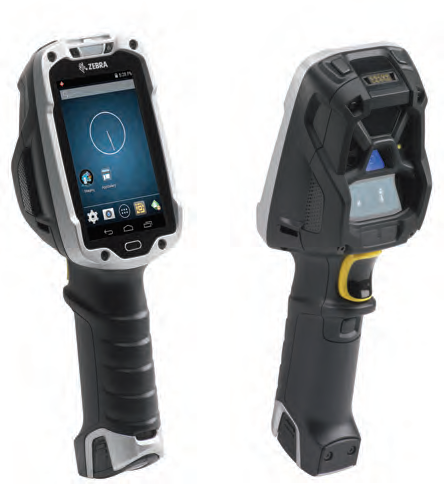
Superior ergonomics for superior productivity and worker comfort
The new scan angle eliminates the constant tilting that traditional designs required to view the screen, increasing productivity by 14%* by reducing wrist motion by 55% and muscle effort by 15%.
* Results are dependent upon use case and scan frequency.
Enterprise-class Android KitKat
Mobility Extensions (Mx) transforms Android™ to an enterprise-class OS, providing enterprise-class security, device management and data capture capabilities.
Rugged and ready for the warehouse
The super-rugged design is built for the challenging warehouse environment. With Zebra’s most extreme impact ratings, the TC8000 operates reliably, even after 2,000 consecutive hits when tumbling and multiple 8 ft./2.4 m drops to concrete. The TC8000 is sealed, ready to handle jetting water and dust. The TC8000 is built to handle constant temperature swings between extreme heat and cold—ideal in outside yards.
An industry first: hands-free proximity scanning with a handheld device
The device can be automatically triggered by the proximity sensor, whether the TC8000 is worn in the hip holster, on the shoulder strap, in the cart mount or desktop mount. Two modes are available: near, for close-up scanning from near contact to 6 in./15 cm; and far, from contact to 1.96 ft./60 cm.
Advanced bar code scanning options
Zebra’s SE4750 imager with proprietary PRZM Intelligent Imaging technology offers unparalleled performance on just about any type of data imaginable—from 1D and 2D bar codes to fully searchable and editable documents. The SE965 engine provides best-in-class 1D scanning performance with patented Adaptive Scanning technology that delivers the widest working range in its class. All options capture bar codes in practically any condition.
Transform “green screens” to elegant all-touch screens with no host modification or coding
All-touch Terminal Emulation gives the front end of Terminal Emulation apps a smart and intuitive touch interface, automatically—and legacy TE green screens are always available to workers at the press of button.
Adobe Reader is required to open and view PDF files. This can be downloaded free from adobe.com.
Available Documents
TC 8000Geset 125 Horizontal Labelling System
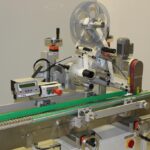
The Geset 125 labelling system is used to label cylindrical products automatically. Depending on the type and dimension of the product, different label sizes are used. The products are fed manually or by a conveying system provided by the customer at an infeed passage of the labelling system. Care should be taken on accurate alignment of the products between the two freely mounted rollers of the roll conveyor. The side guide’s position the products flush with the outside edge of the roll conveyor.
The roll conveyor feeds the products to the labeller. There the label is applied with the part running forward onto the product and it is pushed by rotation and the back pressure of the wrapping unit onto the product. The back pressure of the wrapping unit (the speed of the wrapping unit is twice as fast as the speed of the base conveyor) enables the product in rotation. The roll conveyor forwards the finished labelled products to the outfeed. Here the products are removed manually or by the customer’s conveying system.
View ProductMarkoprint Integra Ultimate
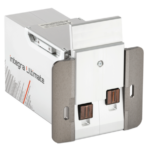
The innovative Integra Ultimate thermal inkjet printer not only provides IP65 protection against dust and moisture, but it also closes and cleans the nozzle plate at each pause. This system ensures that the printing is always clean, with faultless results even after extended breaks. As a result, the ink cartridges’ open times are multiplied many times. Two HP Class thermal inkjet ink cartridges can be used with the print head. As a result, the system produces beautiful prints with a maximum height of 25 mm.
View ProductZebra FS70 Fixed Industrial Scanner
Today more than ever, the increasing demands of international commerce and its global supply chain are pressuring companies to deliver more — and to do it faster. From manufacturing to logistics to the end customer, success is driven by the ability to quickly move and track the products that drive your business.
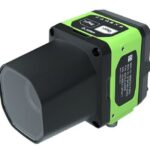
The FS70 Fixed Industrial Scanner is your configurable and customisable solution. Easily keep pace with your business, enabling quality control and track-and-trace of every part and package as it moves through production, storage and fulfilment. Whether you need a high-powered lens to read a very small barcode from a long distance, or a wide-angle lens to capture barcodes on extremely large parts, the FS70 addresses it all. C-mount external lenses allow you to achieve the working range and field of view your application and environment requires. And compatibility with virtually any external lighting solution ensures reading of the most challenging barcodes — even low-contrast direct part marks or those printed on curved or reflective surfaces. The result? Best-in-class production, warehousing, distribution and logistics processes that inspire your business to reach its highest potential.
View Product
Zebra ZT510 Industrial Printer
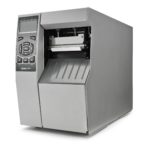
ZEBRA ZT510 – NEXT-GENERATION PRINTING THAT IS BUDGET-FRIENDLY
Designed to strike the ideal balance between performance and value, the Zebra ZT510 includes the core features you need in an industrial printer at a cost-effective price point.
View Product










