


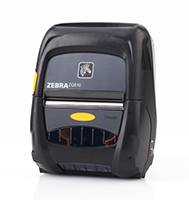
ZQ500 SERIES Mobile Printers
Extreme environments and bangs and bumps are no match for these lightweight, compact printers. Zebra’s ZQ510™ and ZQ520™ printers are the most rugged printers available. They perform in the widest operating temperature range in the industry and can withstand repeated drops to concrete from up to 6.6 feet. Water spray is no match with their IP54 rating. Featuring Zebra’s Link-OS® environment, these premium printers are easy to integrate, manage and maintain. With large buttons and a user-friendly interface, they are easy to operate, even when wearing gloves.
Industry
 Transportation & Logistics
 Government
 Manufacturing
Used For:
- Direct Store Delivery
- Field Service
- Invoices and Receipts
- E-Citation and Ticketing


Adobe Reader is required to open and view PDF files. This can be downloaded free from adobe.com.
Available Documents
ZQ500 BrochureMarkoprint Integra One ip LX
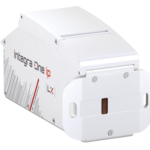
Unleash the Power of Proven Washdown Technology (IP Protection) for Seamless Performance in Complex and Demanding Applications. Experience High-Speed Printing and Effortless Operation with Up to 10 mm Print Distance. Discover Impressive Innovations, including a Patented Mechanism for Secure Ink/Printhead Unit Hold, Setting a New Standard in Printing Excellence.
View ProductMarkoprint Integra PP 108
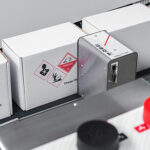
The Markoprint Integra PP108 is the first inkjet printer with SEIKO printing technology and a circulating ink system. It features a POZIFLOW circulating ink system which prevents the accumulation of air in the nozzles and ensures a permanent, clean print image without missing print due to blocked nozzles. The system’s ink tank can be installed above, below, or at the same height as the print head without any problems. The new SEIKO printhead has a print height of 108 mm and achieves a remarkable speed of up to 150 meters per minute with a high resolution of 360 dpi.
Suited to Dual Colour Printing Applications such as Hazard Labelling, Dual Colour overprinting and Direct Printing Applications to corrugate, and web printing applications, the PP108 is the latest high end, economical Inkjet System using the latest Drop on Demand Printing Technology.
View ProductMarkoprint Integra PP RAZR
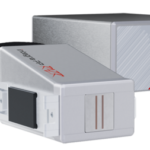
Experience Effortless High-Resolution Printing: Introducing the Integra PP RAZR with Cutting-Edge Technology. Print Up to 34mm High on Virtually Any Product Surface with Ease. Be Amazed by the Permanent Print Head’s Impressive Resolution, Lightning-Fast Speed, and Integrated Redundancy. Plus, its Compact Design Ensures Seamless Placement in Any Production Facility.
View ProductZebra FS40 Fixed Industrial Scanner
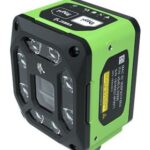
Enable Performance. Inspire Potential. Experience The Difference.
Today more than ever, the increasing demands of international commerce and its global supply chain are pressuring companies to deliver more — and to do it faster. From manufacturing to logistics to the end customer, success is driven by the ability to quickly move and track the products that drive your business.
Address it all with Zebra’s FS40 Fixed Industrial Scanner designed to meet the comprehensive requirements of today’s production and delivery processes. The FS40 easily keeps pace with the fastest moving operations, enabling track-and-trace through the automatic and flawless decode of information on every part and package as it moves through production, storage and fulfilment — capturing even the most challenging barcodes. The result? Best-in-class production, warehousing, distribution and logistics processes that inspire businesses to reach their highest potential.
View Product










